
AI agents and MCP
Connect Claude Code, Claude Desktop, Cursor, VS Code, Windsurf or Codex to Orca in one click, with no tokens to copy, and see every tool they get.
On this page
Orca is an MCP server. Connect Claude or another AI tool and it can do what you'd do in Orca: start a project from a folder, switch its profiles, read logs, add an HTTPS route, run a worktree instance of a branch and tell you its URL. You don't need an API key, and you don't copy any tokens.
Connect in one click
Open Settings → AI & agents. Under Connect your AI tools, Orca lists the AI tools it supports and shows which of them are on this computer:
| Tool | Where Orca adds itself |
|---|---|
| Claude Code | claude mcp add --scope user, or ~/.claude.json |
| Claude Desktop | claude_desktop_config.json in Claude's settings folder |
| Cursor | ~/.cursor/mcp.json |
| VS Code (Copilot agent mode) | mcp.json in VS Code's user settings |
| Windsurf | ~/.codeium/windsurf/mcp_config.json |
| Codex | ~/.codex/config.toml |
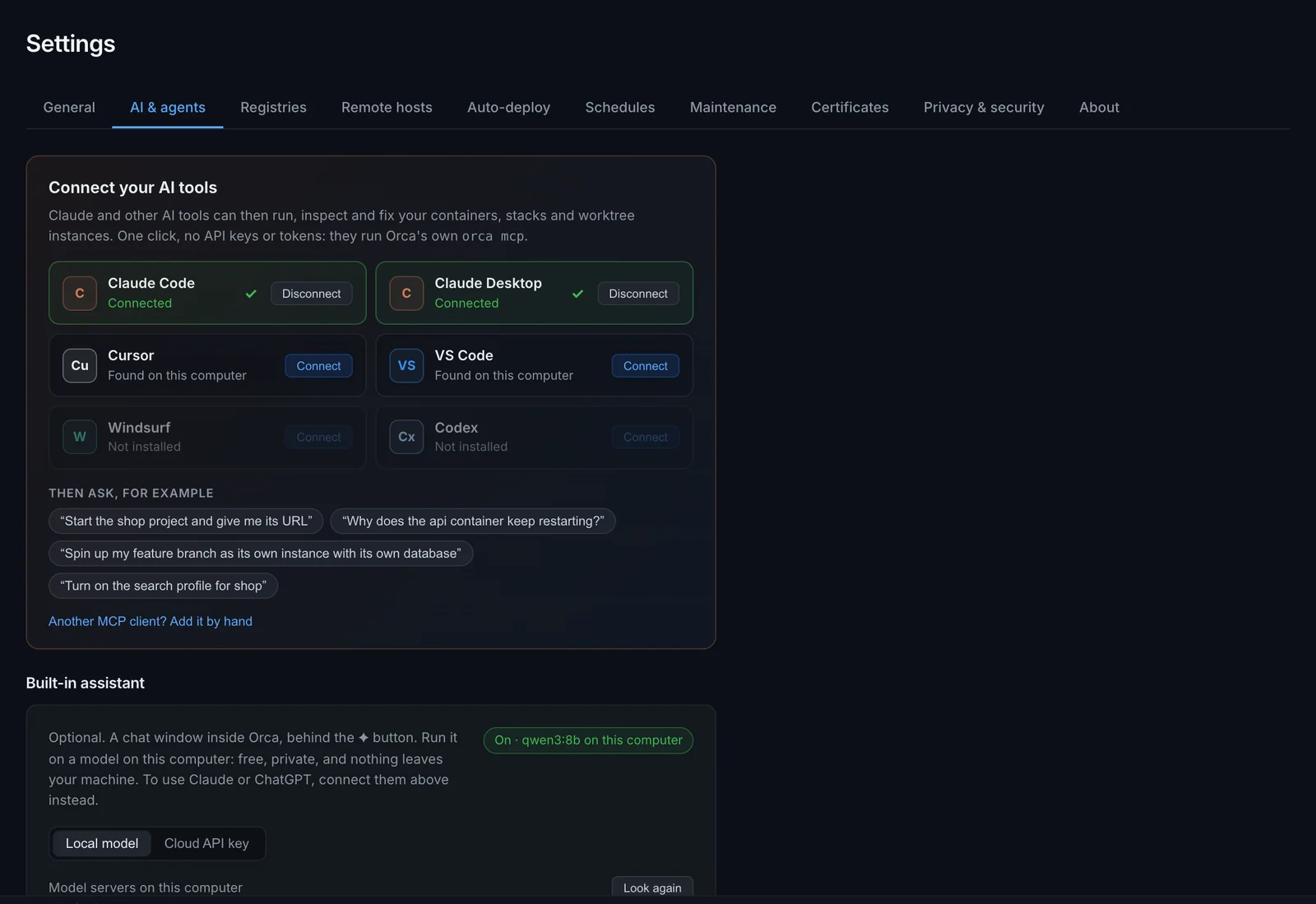
Click Connect next to a tool. Orca adds one entry named orca to that tool's config and leaves the rest of the file alone. Then:
- Claude Code and Codex: start a new session. In Claude Code,
/mcplists Orca. - Claude Desktop: quit and reopen it.
- Cursor, VS Code and Windsurf: Orca shows up in the tool's MCP settings.
Disconnect removes that entry again. While none of your AI tools has Orca, the dashboard shows a one-line invitation to connect the ones it found.
Then ask, for example:
- "Start the project in ~/code/shop and give me its URL."
- "Why does the api container keep restarting?"
- "Turn on the search profile for shop."
- "Run my feature branch as its own instance, with its own database."
Why there's no token
The entry Orca adds runs orca mcp, the Orca CLI as a local MCP server over stdio:
{
  "mcpServers": {
    "orca": { "command": "/Users/you/Library/Application Support/orca/bin/orca", "args": ["mcp"] }
  }
}
orca mcp reads the daemon's API token from Orca's own config file each time it starts, and passes your AI tool's requests on to the daemon. The token never appears in the AI tool's config, so there's nothing secret to commit or paste into a chat, and if you reset Orca's token, connected tools keep working.
Orca keeps its own copy of the CLI in its data folder (~/Library/Application Support/orca/bin on macOS, ~/.local/share/orca/bin on Linux, %LOCALAPPDATA%\orca\bin on Windows) and refreshes it whenever the app starts. Updating Orca or moving the app doesn't break your AI tools' configs.
If Orca isn't running when your AI tool calls it, the tool gets a clear error saying so instead of hanging.
Connect from the terminal
The same works from the CLI, for example on a server or in a dotfiles script:
orca mcp install            # connect every supported AI tool found on this machine
orca mcp install cursor     # or just one: claude-code, claude-desktop, cursor, vscode, windsurf, codex
orca mcp status             # which tools are found and connected
orca mcp uninstall # remove Orca from every tool it was added toOther MCP clients
Any MCP client that starts stdio servers can run Orca. Give it the command orca with the argument mcp, the same as the JSON above. Settings → AI & agents → Another MCP client? shows the block with the full path on your machine, ready to copy.
Manage a remote host
If you've added a remote Orca host in Remote hosts, an AI tool can manage that host instead of this computer. Add --host with the host's name to the arguments:
{ "command": "orca", "args": ["mcp", "--host", "build-server"] }orca mcp --host uses the URL, token and TLS setting Orca Desktop already stores for that host. Connect it under a second name, such as orca-build-server, to have both.
HTTP endpoint (advanced)
The daemon also speaks MCP over HTTP at http://127.0.0.1:9477/api/v1/agent/mcp, for clients that can't start local commands. This one needs the API token as a Bearer header. Settings → AI & agents → HTTP endpoint (advanced) shows and copies the token. Orca stores it as api_token in its config file:
| Platform | Config file |
|---|---|
| macOS | ~/Library/Application Support/orca/config.json |
| Linux | ~/.config/orca/config.json (or /etc/orca/config.json if it exists) |
| Windows | %APPDATA%\orca\config.json |
claude mcp add --transport http orca http://127.0.0.1:9477/api/v1/agent/mcp \
--header "Authorization: Bearer YOUR_TOKEN_HERE"The token gives full control over your containers and clusters. Keep it out of files you commit, such as a shared .mcp.json. The one-click connection above avoids the problem.
The endpoint takes JSON-RPC over POST and supports initialize, ping, tools/list and tools/call (protocol versions 2025-06-18, 2025-03-26 and 2024-11-05).
What the agent is told
When an AI tool connects, Orca sends a short map of its concepts (stacks, orca.yaml, workspaces, the gateway, databases, worktrees) and instructions on when to use which tools: deploy_project for a folder that isn't running yet, the instance_* tools inside a git worktree, a snapshot before risky database changes, and to ask before removing anything or importing over a database.
For anything deeper, the AI tool reads Orca's own documentation through orca_docs: these pages, as they were when your Orca was built, so the keys it writes into orca.yaml or orca-workspace.yaml match the version you run. It's told to read the relevant page before writing either file, rather than guessing. Each tool also carries hints that clients use to decide when to ask you first:
- Tools that only read (listings, logs, status,
read_orca_yaml) are markedreadOnlyHint, so clients may run them without asking. - Tools that only add or start something (starting or restarting a container or stack, pulling images, adding a route or project, starting a build or an instance) are marked as not destructive.
- Everything else that changes state is marked
destructiveHint, from stopping a container or switching profiles to running a command in a container, applying Kubernetes YAML or removing anything, so clients that respect the hint ask you first.
Agents working in git worktrees
If your project is registered with Orca, each git worktree can run its own instance of the app: its own URLs and ports, with databases and other shared services running once. An agent working in a worktree passes its worktree path to the instance_* tools:
instance_upstarts or rebuilds this branch's instance and returns its URLs, host ports and the path of its.orca/envfile.instance_statusorinstance_envgives the URLs and ports to test against.instance_logsshows what went wrong.instance_downstops it when the work is done.
Before running migrations or writing test data, ask for an own copy of the database so other worktrees aren't affected, for example "data": {"postgres": "own-database"} on instance_up. The modes are shared, own-database and own-server.
When you set up a project for worktrees in Orca, the setup dialog can also add a short section to the project's CLAUDE.md or AGENTS.md that tells coding agents to use orca up, .orca/env and these MCP tools. The same commands are available from the shell: see CLI reference.
OpenAI-compatible endpoint
Agent frameworks that use OpenAI-style function calling can send tool calls to:
POST http://127.0.0.1:9477/api/v1/agent/openai/chat/completions
Authorization: Bearer YOUR_TOKEN_HERE
This endpoint doesn't run a model. It executes the tool calls you send and returns their results:
- It reads
tool_callsfrom the lastassistantmessage inmessages, or from a top-leveltool_callsarray. - Each result comes back in
tool_resultsas arole: "tool"message with the matchingtool_call_id. - A request without tool calls returns the tool list in OpenAI function format.
- At most 16 tool calls are accepted per request.
curl -X POST http://127.0.0.1:9477/api/v1/agent/openai/chat/completions \
  -H "Authorization: Bearer $TOKEN" \
  -H "Content-Type: application/json" \
  -d '{
    "messages": [{
      "role": "assistant",
      "tool_calls": [{
        "id": "call_1",
        "type": "function",
        "function": { "name": "container_logs", "arguments": "{\"id\": \"web\", \"tail\": 50}" }
      }]
    }]
}'Direct tool execution
For scripts and custom integrations, list the tools and call one at a time.
# Tool definitions in OpenAI function format
curl -H "Authorization: Bearer $TOKEN" \
  http://127.0.0.1:9477/api/v1/agent/tools

# Run one tool
curl -X POST http://127.0.0.1:9477/api/v1/agent/execute \
  -H "Authorization: Bearer $TOKEN" \
  -H "Content-Type: application/json" \
  -d '{"tool": "diagnose_container", "arguments": {"id": "web"}}'
A successful call returns {"result": ...}. A failed one returns HTTP 400 with {"error": "..."}.
Tool reference
Orca has 74 agent tools. The same set is available over MCP, the OpenAI-compatible endpoint, direct execution, and to the built-in AI assistant.
Containers
| Tool | What it does |
|---|---|
list_containers | List all containers with status, ports and resource usage. |
inspect_container | Container details: env vars, mounts, network settings, exit code and errors. |
container_logs | Recent log lines (tail, default 100). |
container_stats | Current CPU, memory and network usage. |
start_container | Start a stopped container. |
stop_container | Stop a running container gracefully. |
restart_container | Stop and start a container. |
exec_in_container | Run a command inside a running container and return the output. |
create_and_run_container | Create and start a container from an image, with ports, env, volumes and CPU/memory limits. |
remove_container | Remove a stopped container (force to remove a running one). |
Diagnostics
| Tool | What it does |
|---|---|
diagnose_container | Inspect data, recent logs, resource stats and exit info in one call. |
check_port_availability | Check whether a host port is free or which container uses it. |
system_health | Docker connection, disk, memory, CPU and warnings. |
environment_status | Whether the container runtime is installed and running. |
Images
| Tool | What it does |
|---|---|
list_images | List images with tags, sizes and creation dates. |
pull_image | Pull an image from a registry. |
remove_image | Remove an image. |
prune_images | Remove all unused images. |
Stacks
| Tool | What it does |
|---|---|
list_stacks | List Compose stacks with their services and status. |
compose_up | Run docker compose up for a stack. |
compose_down | Run docker compose down for a stack. |
deploy_project | Start the compose project in a folder and apply its orca.yaml (routes, setup hooks). Takes path. |
stack_restart | Restart every service of a stack. |
stack_pull | Pull the latest images for a stack's services. Run compose_up afterwards to recreate what changed. |
stack_logs | Recent logs of a stack, all services or one service (tail, default 100). |
stack_profiles | A stack's compose profiles, which are on, and the state of every service. |
set_stack_profiles | Choose which profiles a stack runs. With apply (default true) and the stack running, starts and stops services to match. |
read_orca_yaml | A stack's orca.yaml: text, path, skipped entries and the state of each route, or a suggested first file. |
write_orca_yaml | Write a stack's orca.yaml. Validated first, applied at once. |
Gateway
| Tool | What it does |
|---|---|
gateway_status | Whether the HTTPS gateway runs, its domain, ports, certificate mode and route count. |
gateway_start | Start the gateway. |
gateway_stop | Stop the gateway. Routes stay configured. |
gateway_routes | Every route: hostname, path, container, port, where it comes from, and whether its service runs. |
gateway_requests | Recent requests through the gateway, newest first, with status and duration. A failed one says why in plain words, such as nothing answers to one-crm-app: its container isn't running. problems shows only failures, query filters by host, path, project or status. |
identify_ports | What each port a container publishes speaks: a web page with its title, or PostgreSQL, Redis, SMTP and so on. |
gateway_add_route | Route a hostname (and optional path) to a container and port. shop becomes shop.localhost. |
gateway_remove_route | Remove a route that was added by hand. |
Storage and networking
| Tool | What it does |
|---|---|
list_volumes | List Docker volumes. |
remove_volume | Delete a volume and its data. It must not be in use. |
list_networks | List Docker networks. |
create_network | Create a Docker network (driver, default bridge). |
Templates
| Tool | What it does |
|---|---|
list_templates | List the one-click app templates. |
deploy_template | Deploy a template by ID, with optional name, port and env overrides. |
Builds
| Tool | What it does |
|---|---|
list_build_targets | Build targets from the builds: section of every project's orca.yaml. |
start_build | Build an image from a target. Returns a build id. |
build_status | A build's status, duration and the end of its log. |
Kubernetes
| Tool | What it does |
|---|---|
k8s_status | Cluster version, node info and pod counts. |
k8s_list_namespaces | List namespaces. |
k8s_list_pods | List pods in a namespace. |
k8s_list_deployments | List deployments in a namespace. |
k8s_list_services | List services in a namespace. |
k8s_list_ingresses | List ingresses in a namespace. |
k8s_list_configmaps | List ConfigMaps in a namespace. |
k8s_list_secrets | List Secrets in a namespace (names only, not values). |
k8s_list_events | List recent events in a namespace. |
k8s_pod_logs | Logs from a pod. |
k8s_get_yaml | YAML manifest of a resource by kind, namespace and name. |
k8s_apply_yaml | Apply a YAML manifest. |
k8s_scale_deployment | Scale a deployment to a number of replicas. |
k8s_restart_deployment | Rolling restart of a deployment. |
k8s_delete_pod | Delete a pod so its controller recreates it. |
k8s_helm_list | List installed Helm releases. |
Orca itself
| Tool | What it does |
|---|---|
orca_docs | Orca's documentation: without a topic, the list of pages; with one, such as databases or orca-yaml, that page in Markdown; section narrows it to the part whose heading matches. No network needed. |
check_for_update | The running version, the latest release, and the headlines of each newer one. refresh asks GitHub now instead of using the last hour's check. |
offer_update | Show the app's Update prompt for the latest version. Nothing installs until you click Update; Orca then restarts, which drops the AI tool's connection for a moment. Without the app (a daemon on a server), it returns the command to upgrade instead. |
Ask "is my Orca up to date?" or "update Orca". When you ask about a feature your version doesn't have yet, the AI tool can check whether a newer release has it.
Workspace
| Tool | What it does |
|---|---|
workspace_status | The joined workspace: shared services and every project, with whether it's cloned and running, its URLs and missing secrets. |
setup_project | Clone, configure and start a workspace project by its key, and return its URLs. Stops and lists missing secrets, which the developer fills in on the Workspace page. |
update_workspace | Pull the workspace file and apply it again. |
join_workspace | Join a workspace by its git URL, or a folder that has it. It changes the gateway for the whole machine, so clients ask first. |
check_workspace | What this machine still needs: gateway ports, the domain, the certificate's expiry, Orca's certificate authority, registry logins, the secret manager's CLI and access to every repository, each problem with what to do. |
fetch_project_secrets | Fill in a project's secrets from Passbolt or 1Password with your own CLI. Returns which were filled; the values never reach the AI tool. |
Databases
| Tool | What it does |
|---|---|
list_databases | The database servers, the databases on them with their project and size, and what each project's orca.yaml requires. No passwords. |
database_connection | Host, port, database and user of a project's database; the password is left out. |
database_snapshot | Save a snapshot of a database, for example before a migration. |
database_restore | Replace a database with a snapshot. Marked destructiveHint. |
database_reset | Empty a database and run the project's seed command. Marked destructiveHint. |
find_database_services | Every project's own MySQL, MariaDB and PostgreSQL containers: engine, version, the database in them, their volumes, and whether the project already requires a shared one. |
database_import | Copy a project's own database into its database on a shared or Orca server, after a snapshot. Translates between MariaDB and MySQL. Marked destructiveHint. |
See Databases, including asking an AI tool to move every project onto shared servers.
Worktree projects and instances
| Tool | What it does |
|---|---|
list_projects | Projects registered for worktree instances, with their shared services and one instance per worktree. |
add_project | Register a git repository (any folder inside it) so each worktree can run as its own instance. |
remove_project | Unregister a project. Nothing in the repository changes. |
The instance tools each take worktree, the absolute path of the git worktree.
| Tool | What it does |
|---|---|
instance_status | Whether the instance runs, its URLs, host ports, services, shared services and env file path. |
instance_up | Start or rebuild the instance and wait until it's up. Options: profiles, rebuild (default true), data modes per shared service. |
instance_down | Stop the instance. remove: true also deletes its volumes, images, own databases and generated files. |
instance_logs | Recent logs, all services or one service (tail, default 200 per service). |
instance_env | URLs, host ports and database names as key/value pairs (the contents of .orca/env). |
instance_db_reset | Reset the worktree's own database in a shared service to a fresh copy of the shared data. |
Related
- AI assistant: the chat window built into Orca, which uses these tools.
- REST API: every daemon endpoint.
- CLI reference:
orca up,orca envand the rest from the shell.