
Workspace routes
Route hostnames, paths, hostname patterns and WebSockets to containers on the workspace network, and how Orca decides which route wins.
On this page
Routes give your team's services their HTTPS addresses: https://billing.local.acme.dev goes to the billing-app container's port 80, https://mail.local.acme.dev to Mailpit. This page covers everything a workspace route can do, how Orca picks a route when several match, and worked examples for common setups.
Routes live in two places in orca-workspace.yaml: the top-level routes for shared services, and each project's routes. Both have the same format.
A route
routes:
  - hostname: billing          # billing.local.acme.dev
    target: "billing-app:80"   # container or network alias, and its port
    title: Billing             # the landing page card's title
The short form on one line is the same:
routes:
  - { hostname: billing, target: "billing-app:80", title: Billing }
Every route needs a hostname and a target. path, title and websocket are optional. The file reference has the exact rules.
Targets
A target is name:port:
- name is a container name or a network alias on the workspace network: what another container on that network would use to reach it. With compose, that's the
container_name, or a name under the service'snetworks: <network>: aliases:. - port is the port inside the container, not one published on your machine. The container doesn't need to publish any ports.
target: "billing-app:80"       # container_name: billing-app
target: "mailpit:8025"         # Mailpit's web UI
The gateway joins the workspace's network, so it reaches every container on it by name. A container that isn't on the workspace network can't be a target: add the network to its compose file.
The name can't contain dots. Use a container name or alias such as billing-app, not a hostname.
Hostnames
- A short name without a dot gets the gateway's domain:
billingbecomesbilling.local.acme.dev. - A name with a dot is used as it is:
billing.example.teststaysbilling.example.test. That includesapi.billing, which is notapi.billing.local.acme.dev. Use dashes for nested names:api-billing.
Hostnames are lower-cased. A wildcard certificate covers one level of names, which is another reason to keep names flat: *.local.acme.dev covers api-billing.local.acme.dev, not api.billing.local.acme.dev.
Paths
A route with a path only takes requests for that path. The rest of the hostname goes to the route without a path.
path | Matches | Doesn't match |
|---|---|---|
/api/* | /api/, /api/orders, /api/orders/7 | /api, /apiary |
/api* | /api, /api/orders, /apiary | /v1/api |
/health | /health only | /health/, /health/db |
The request reaches the target with its full path: /api/orders arrives as /api/orders, not /orders.
On the landing page and the Workspace page, a path route's address ends without the *, such as https://shop.local.acme.dev/admin.
Paths may overlap on one hostname: the longer one is tried first, so with /api/* and /api/admin/*, /api/admin/users goes to the second.
Hostname patterns
A * in the first part of a hostname matches many hostnames:
hostname | Matches | Doesn't match |
|---|---|---|
*-shop | nordic-shop.local.acme.dev, b2b-shop.local.acme.dev | shop.local.acme.dev, a.b-shop.local.acme.dev |
*-docs | billing-docs.local.acme.dev | docs.local.acme.dev |
* | every one-level name: anything.local.acme.dev | local.acme.dev, a.b.local.acme.dev |
The * stands for one or more letters, digits and dashes, within the first part of the name. It never matches a dot, so a pattern never reaches deeper names. Matching ignores case.
Patterns are for apps that serve many names from one container, such as one storefront per brand or tenant, where the app reads the hostname to decide what to show. Add an exact route for the plain name too if the app answers there.
A pattern needs a certificate that covers every name it matches:
- With the workspace's own certificate, use a wildcard for the domain, such as
*.local.acme.dev. It covers every pattern in the first part. - With Orca's certificate authority, Orca issues a wildcard certificate for the pattern's parent domain,
*.local.acme.dev, by itself.
The names must also resolve to your machine. A wildcard DNS record for *.local.acme.dev does that; see Choose a domain and certificate.
WebSocket routes
With websocket: true, a route takes only WebSocket connections: requests with an Upgrade: websocket header. Normal page requests on the same hostname skip it and go to the next route that matches.
routes:
  - { hostname: billing, target: "billing-app:80" }
  - { hostname: billing, target: "billing-reverb:8080", websocket: true }
Here, https://billing.local.acme.dev serves the app, and a WebSocket to wss://billing.local.acme.dev/app/… reaches the Reverb server. The browser talks to one hostname, so there's no second address to configure, and no cross-origin rules to satisfy.
You don't need a WebSocket route for an app that serves its own WebSockets: WebSockets pass through every route. You need one when the WebSocket server is a different container from the one serving the pages, or to override a catch-all WebSocket route (see below).
websocket combines with path and with patterns.
Which route wins
When several routes match a request, the gateway takes the most specific one. It compares routes in this order:
- WebSocket routes first. For a WebSocket connection, a matching
websocket: trueroute wins over any normal route. Normal requests never match WebSocket routes. - Exact hostnames before patterns.
shopwins over*-shopand*. - Among patterns, the one with more fixed characters wins.
*-shopwins over*, and*-b2b-shopover*-shop. - A route with a path before one without, for the same hostname.
shopwith/api/*wins overshopalone for/api/orders.
The order of routes in the file doesn't matter. Note what rule 3 implies: a route for * with /api/* doesn't catch nordic-shop.local.acme.dev/api/orders if there's a route for *-shop without a path, because *-shop is the more specific hostname. Repeat the path route for each pattern that needs it, as in the tenant example.
Requests that match no route at all get the gateway's landing page.
Examples
App and API on one hostname
The app on shop, and its API, a separate container, under /api/:
routes:
  - { hostname: shop, target: "shop-web:80", title: Shop }
  - { hostname: shop, path: "/api/*", target: "shop-api:8080", title: Shop API }
https://shop.local.acme.dev/api/orders goes to shop-api, everything else to shop-web. Another project can put its app under a path of the same hostname the same way, such as an admin panel at /admin* from its own repo.
Tenant subdomains
A storefront that serves one store per brand, nordic-shop.local.acme.dev, b2b-shop.local.acme.dev and so on, plus the plain shop.local.acme.dev, with the API under /api/ on all of them:
routes:
  - { hostname: shop, target: "shop-web:80", title: Shop }
  - { hostname: "*-shop", target: "shop-web:80" }
  - { hostname: shop, path: "/api/*", target: "shop-api:8080" }
  - { hostname: "*-shop", path: "/api/*", target: "shop-api:8080" }
Quote hostnames with * in YAML. The app reads the Host header, which the gateway passes on unchanged, to pick the store.
Reverb or Vite sockets on the app's hostname
A Laravel app with Reverb, and a Vite dev server for hot reload on its own hostname:
routes:
  - { hostname: billing, target: "billing-app:80", title: Billing }
  - { hostname: billing, target: "billing-reverb:8080", websocket: true }
  - { hostname: billing-vite, target: "billing-vite:5173", title: Billing Vite }
  - { hostname: billing-vite, target: "billing-vite:5173", websocket: true }
The app's .env points Echo at its own hostname on port 443, such as REVERB_HOST=billing.local.acme.dev, REVERB_PORT=443 and REVERB_SCHEME=https. The last route looks redundant, since Vite's own route would carry its WebSocket anyway, but it's needed when the workspace also has a catch-all WebSocket route like the one below: otherwise Vite's hot reload socket would go to the catch-all.
A catch-all WebSocket server
Teams that share one Pusher-compatible server, such as soketi, for every app can send every WebSocket to it, on any hostname:
routes:
  - { hostname: soketi, target: "soketi:9601", title: Soketi metrics }
  - { hostname: "*", target: "soketi:6001", websocket: true }
Each app then connects its Echo or pusher-js client to its own hostname, and the socket reaches soketi. Every WebSocket route in a project, such as Reverb or Vite above, is more specific than * and keeps working.
The catch-all also takes WebSockets that an app serves itself, such as Livewire or a GraphQL subscription endpoint. For each of those, add a WebSocket route to the app's own container on its hostname, optionally with a path:
- { hostname: shop, path: "/checker/ws*", target: "shop-web:80", websocket: true }On the landing page
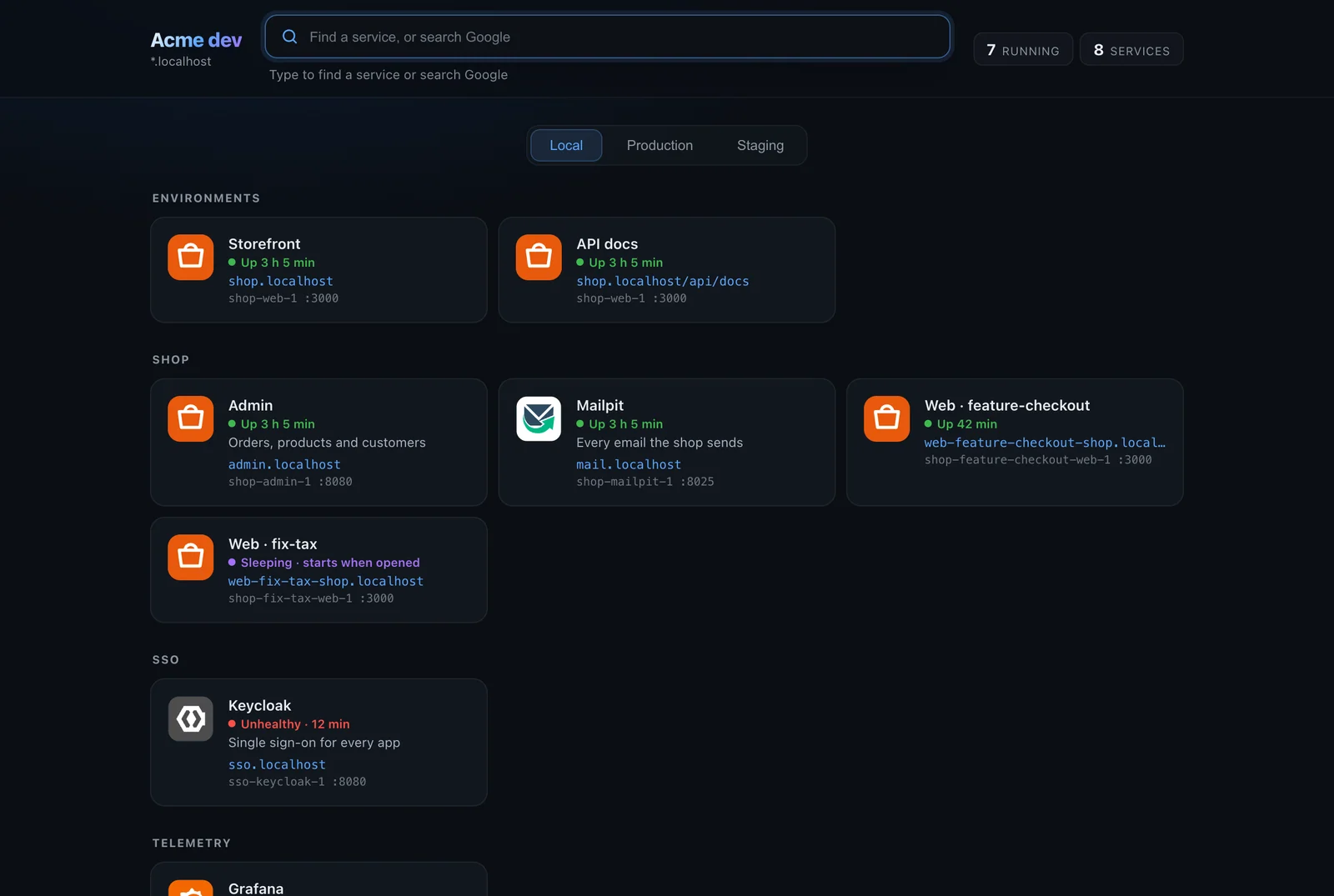
The gateway's landing page, at https://local.acme.dev, shows a card for every route you can open, with whether its container runs. See The landing page.
- Pattern and WebSocket routes don't get cards, since there's no single page to open.
- A project's routes are grouped under the project's key.
- Shared routes are grouped under Shared services.
- A card's title is the route's
title, or one made from the hostname:partner-apibecomes "Partner Api". Settitlefor proper names. - A card shows Stopped when its container exists but is stopped, and Not running when there's no such container, for example a project that isn't set up yet.
Links per environment, such as staging and production addresses, come from the shared stack's orca.yaml. See The shared stack's orca.yaml.
From inside containers
Containers on the workspace network can reach route hostnames too: https://billing.local.acme.dev works from inside the crm-app container the way it does in your browser. This matters for OIDC issuer URLs, webhooks and server-to-server calls that use public names.
It works because the gateway carries every exact route hostname as a network alias on the workspace network, so Docker's DNS answers those names with the gateway's address. Two limits:
- Pattern hostnames aren't aliases. From inside a container,
nordic-shop.local.acme.devresolves through normal DNS, which typically gives127.0.0.1: the container itself. Call an exact hostname, or the target container directly. - The certificate must be trusted inside the container. A workspace certificate from a public certificate authority already is. With Orca's own certificate authority, the container must trust it: see Trust it inside containers.
Conflicts
A hostname and path can have only one route. When a workspace route wants a hostname and path that another route already has:
- Routes added by hand on the Gateway page, and worktree instances, keep it. The workspace route is left out.
- A route from a project's own orca.yaml or container labels for the same hostname and path takes over from the workspace's route for that project, once the project runs. The workspace's routes for a project stand in until the project routes its hostnames itself.
- The workspace's shared routes (the top-level
routes:) keep their hostnames. A project route that asks for one is left out, and the Gateway page's Routes tab names the workspace that has it.
A workspace route is also left out when a route added by hand or a worktree instance has its hostname. If a workspace hostname goes to the wrong place, check the Routes tab for another route with the same name.
When a project moves its routes into its own orca.yaml, remove them from the workspace file too, to keep one place to look.
Related
- File reference: the exact rules for each key.
- Gateway: certificates, ports and the landing page.
- Troubleshooting: when a route doesn't reach its container.